Features

Everything around the student, working together

EdSmart Studio brings tutoring, homework, assessments and progress into one place, built on the school’s own curriculum.

For students

A tutor beside you, at your own pace

AI Tutor

Learn a topic, the way your school teaches it

Pick a topic from your school’s own curriculum and learn it interactively. The tutor is grounded in approved curriculum content, not the open internet.
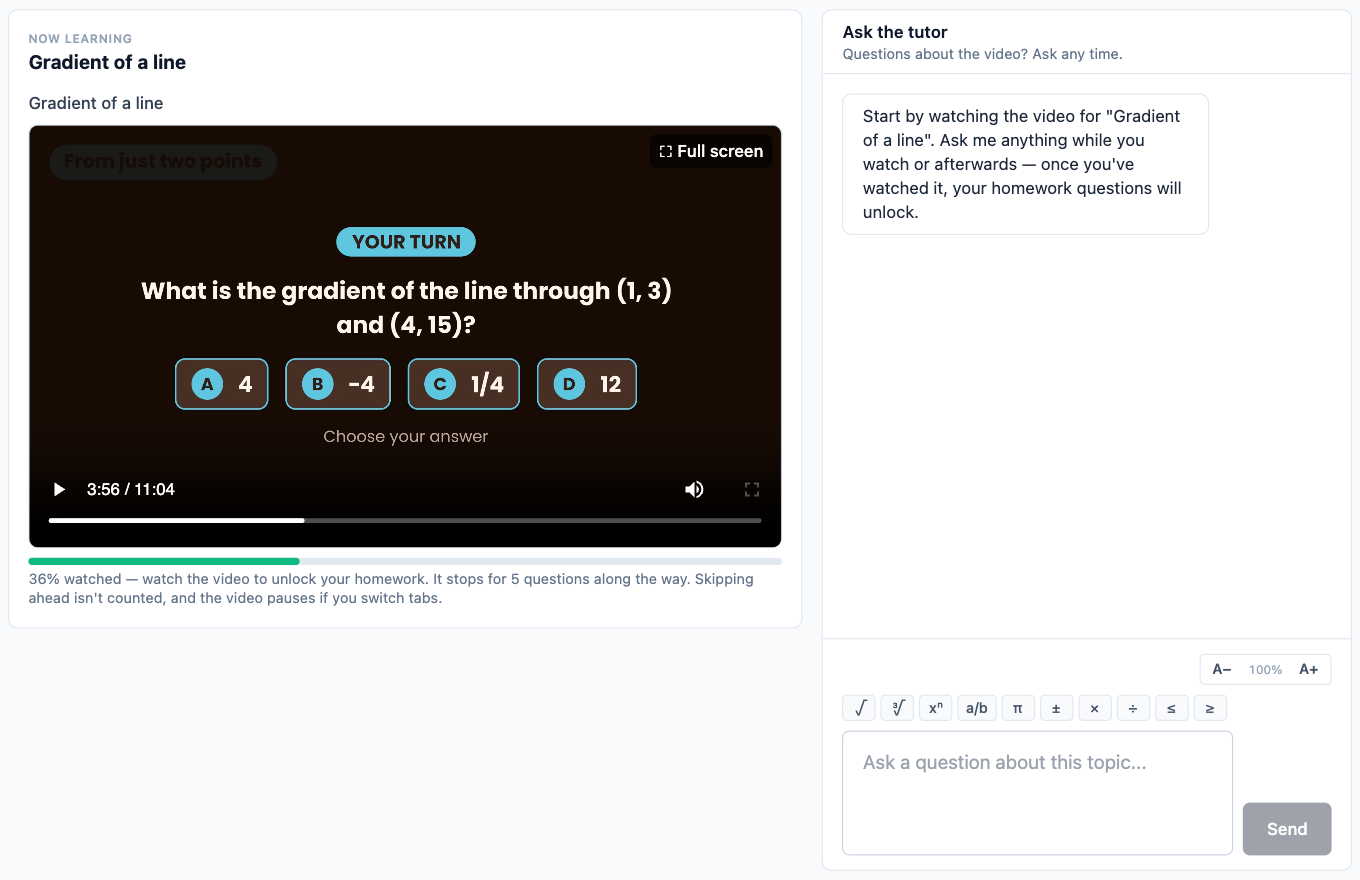
  • Video-first lessons, with questions inside the video.
  • Homework unlocks once you’ve watched the lesson.
  • “Ask the tutor” chat, right alongside the lesson.
A video lesson on the gradient of a line paused on a question, with the Ask the tutor chat beside it
Your curriculum

Start exactly where your class is

Your school’s syllabus is laid out unit by unit and topic by topic, with each one marked as learned, in progress or not started. Weak areas are flagged as worth learning again.
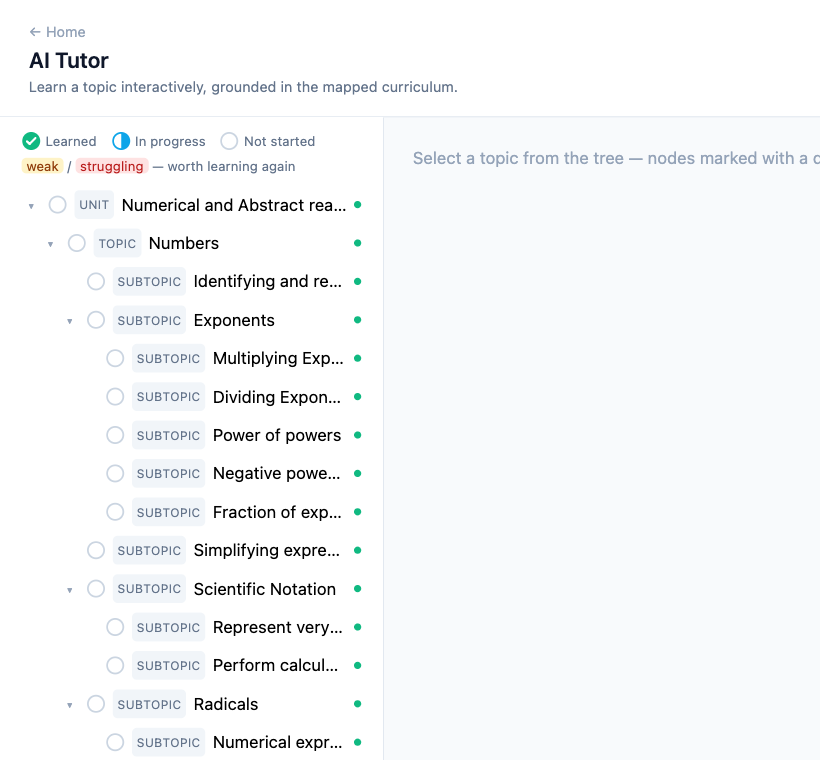
The AI Tutor topic tree: units, topics and subtopics with learned, in progress and not started marks
Word-problem coaching

A calm method for long word problems

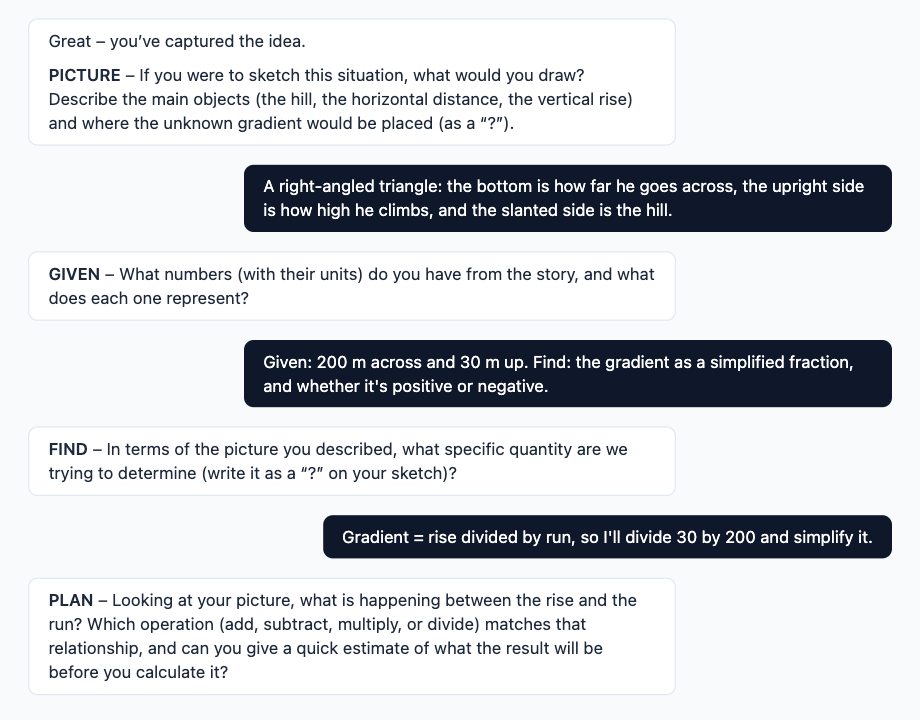
Word problems are worked through one step at a time, and your progress is shown for each step:
  1. Understand
  2. Picture
  3. Given
  4. Find
  5. Plan
  6. Solve & Check
The tutor coaching a word problem about cycling up a hill, step by step through Picture, Given, Find and Plan
Homework Help

Hints, never the direct answer

Work through the homework your teacher set. The tutor asks Socratic questions to guide you, then gives feedback on your attempt, so you understand it rather than copy it.
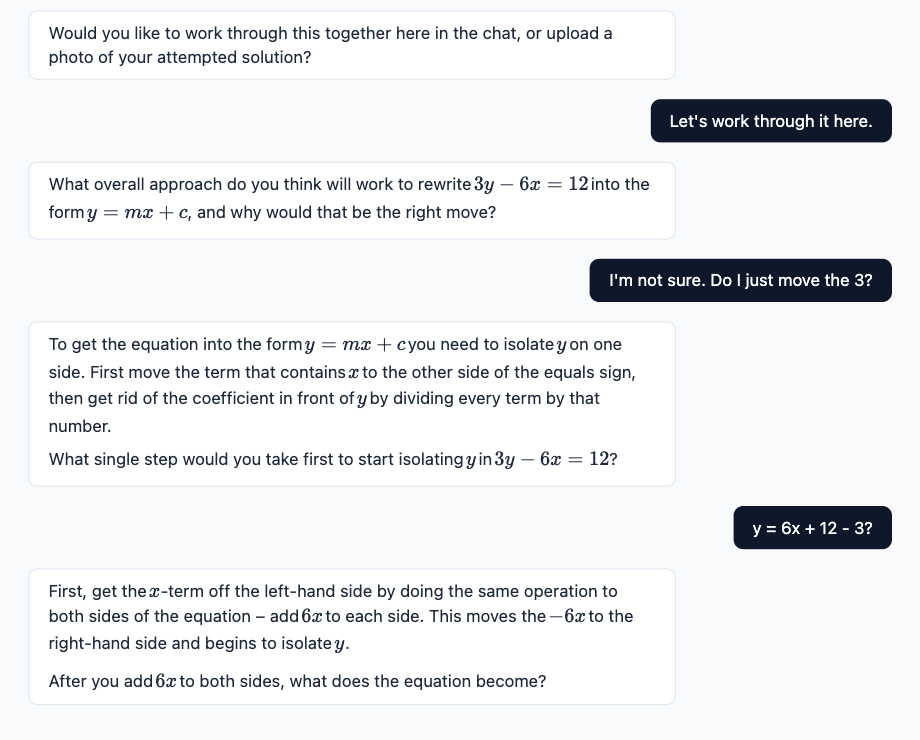

  • Answer by typing, writing on a pad, or a photo of your working.
  • The word-problem steps are tracked here too.
Homework Help: the tutor guides a student to rearrange 3y − 6x = 12 with questions instead of the answer
A homework question with the step tracker Understand, Picture, Given, Find, Plan, Solve & Check
Assessments

Practise for the test, and know exactly what to fix

Your teacher can set assessments, or you can set one for yourself.
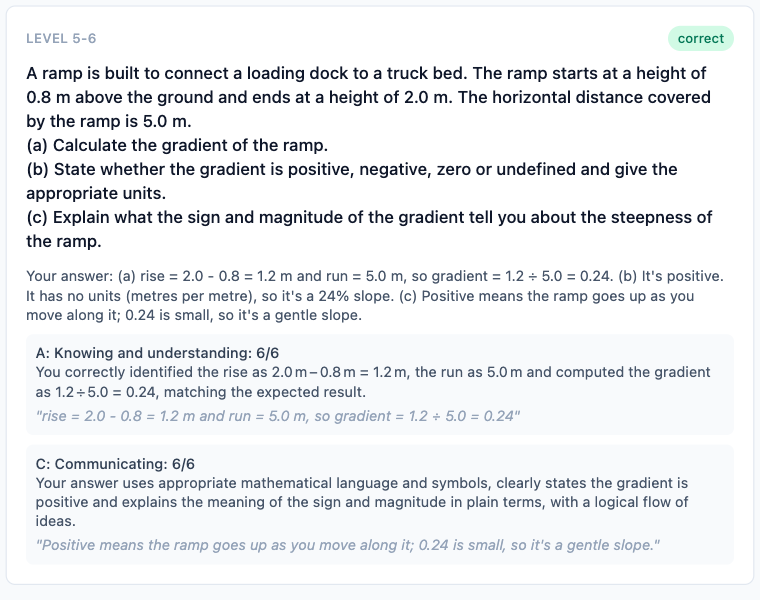
  • Levelled questions, grouped Level 1–2, 3–4, 5–6 and 7–8.
  • Graded with detailed feedback against IB criteria: A Knowing and understanding, B Investigating patterns, C Communicating, D Applying mathematics in real-life contexts.
  • “Retake weak areas”, and “review with the tutor” on any answer.
  • Type, handwrite on a pad, or send up to 3 photos per answer.
  • Download the paper as a PDF or print it, answer on paper, then upload photos.
  • Upload an existing paper and turn it into an assessment.
A graded Level 5–6 answer with feedback for criterion A, Knowing and understanding, and C, Communicating
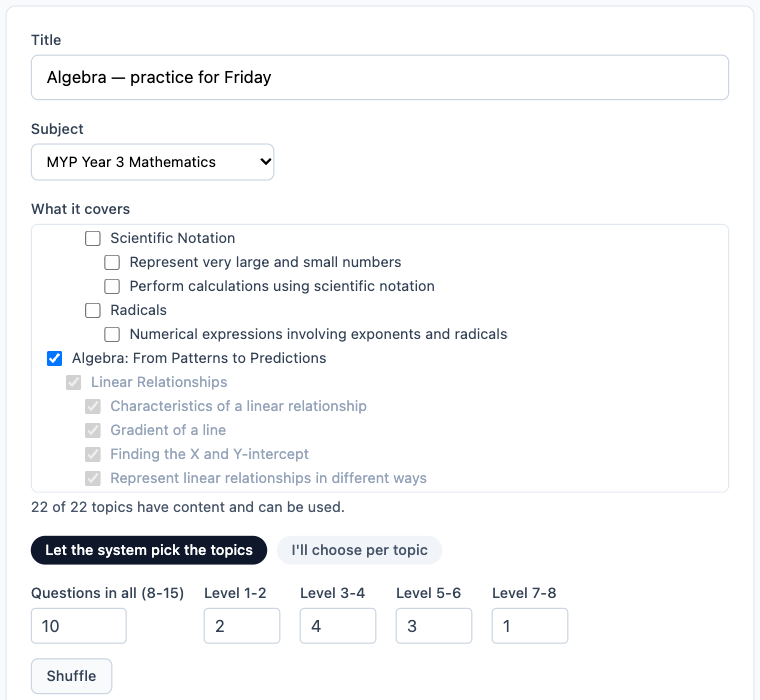
Creating an assessment: title, subject, the topics it covers and how many questions at each level
Progress

Your strengths and gaps, built automatically

Every tutoring session, homework and assessment adds to a picture of what you know, organised by subject, unit, topic and concept. You can see what’s strong, what’s developing and what needs work.
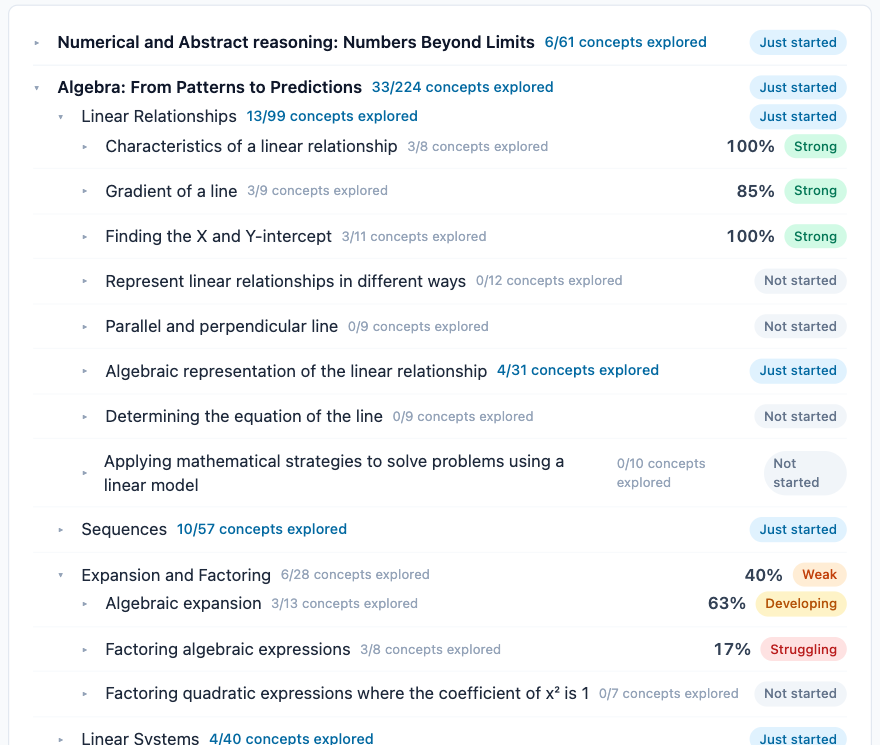
Progress view for Algebra: topics rated Strong, Developing, Weak or Struggling, with concepts explored

Rewards

Points, streaks, Bronze and higher tiers, avatars, and optional celebration sounds.

Proper maths display

Fractions, exponents and roots look the way they should, with a maths toolbar for typing them.

Adjustable text size

Make the text bigger or smaller, so reading is comfortable.

For parents

Know where your child is stuck, any day

Progress in detail

See what they’ve learned and what still needs work

Follow your child’s progress by unit, topic and concept, including how they handle each step of a word problem. No need to wait for the next report card.
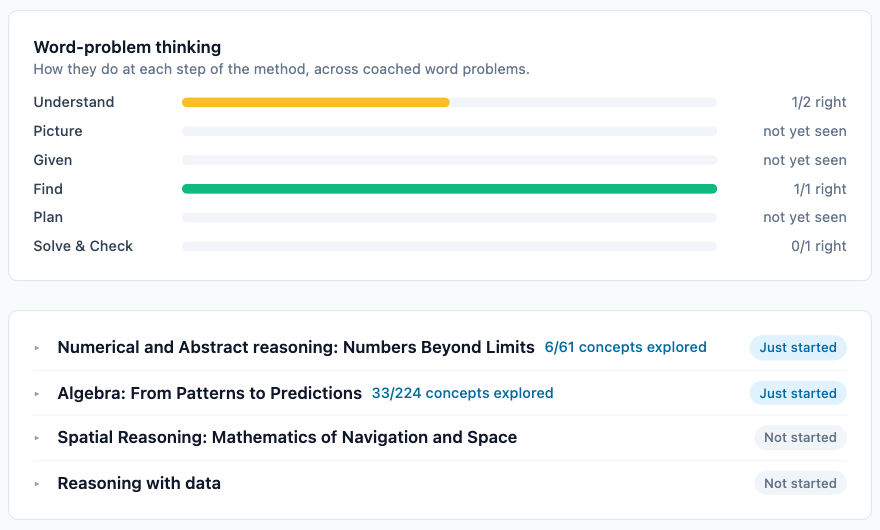
A parent’s view of their child’s progress: word-problem steps and each maths unit’s status
Practice assessments

Set a practice test, then review the feedback

Create an assessment for your child on the topics coming up, then read the feedback with them once it’s marked.
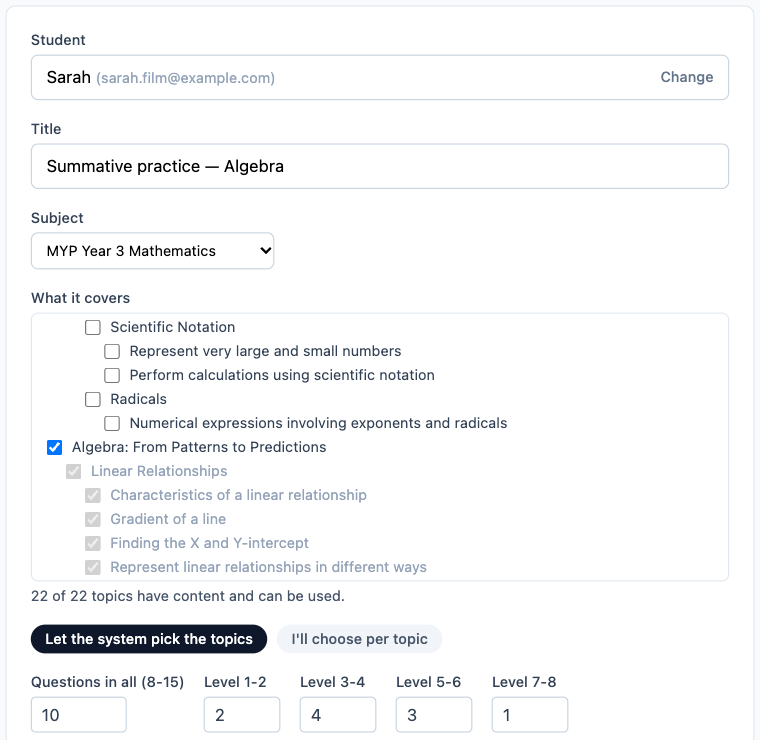
A parent creating a practice assessment for their child: student, title, subject and topics
For teachers

Your classes, your homework, less marking

Cohorts

Cohorts are your classes

A cohort, such as “Grade 8 Section A”, holds its students and one or more teachers. Any teacher in the cohort can assign work to the whole class, and students who join later receive it too.

  • Assign homework to a cohort or a single student by uploading a sheet (photo, PDF or Word). It’s matched to a curriculum topic automatically.
  • Set assessments for a cohort or student, and see each student’s status and score.
  • Build a question bank by uploading questions from existing papers.
Placeholderteacher screenshot — needs a demo teacher account
Teacher view: a cohort with its assigned homework and each student’s status
For schools

Your curriculum, your structure, real insight

Curriculum-grounded

Your school’s own syllabus is loaded and mapped, so the tutor teaches what the school teaches. Curricula so far include IB MYP and Cambridge-style, starting with maths.

Organised like your school

A school holds its cohorts, with four roles: student, parent, teacher and admin.

Insight for management

See progress and learning patterns across students, so staff can spend their time on each student’s specific needs.

Admin tools

User management, plans and limits, and monitoring of AI-usage costs.

Placeholderschool admin screenshot — needs a demo admin account
School admin view: cohorts, users and progress across students

See it with your own class

Start free with the AI tutor today, or book a demo to see how EdSmart Studio could work for your school.